30 September 2026 · Twitter Ban Service · 12 min read
How to recover a deleted Twitter account in the 30 days X allows, and what is left after day 30
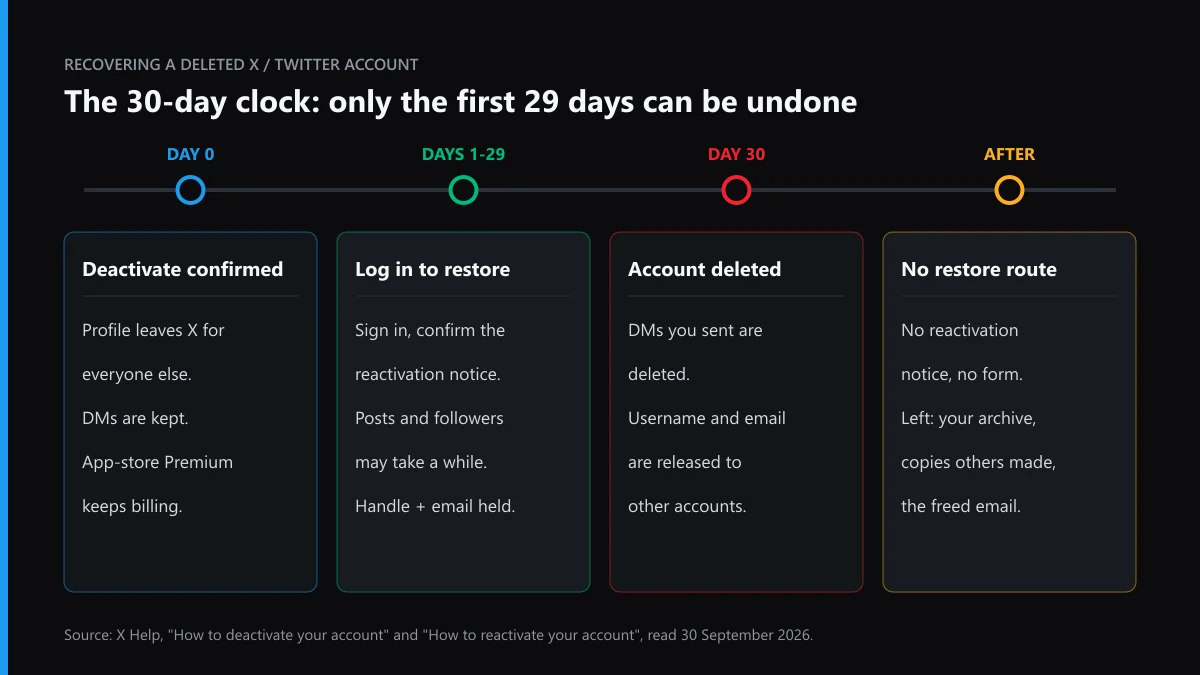
You can recover a deleted Twitter account only while it is still deactivated. Sign in within 30 days of pressing Deactivate and X asks whether to reactivate. On day 30 the account is deleted, its username and email are released, and X offers no restore form. What remains afterwards is your own archive and copies other people saved.
Can you recover a deleted Twitter account, or only a deactivated one?
Only a deactivated one. The difference is a date, not a button.
X has no separate delete control. Pressing Deactivate starts a 30-day period, and if nobody signs in before it closes, the account is deleted and the username stops being associated with it. That is how X's deactivation help page puts it, and the same page calls deactivation the first step to permanent deletion. So a person who says the account was "deleted last week" nearly always has a deactivated account that one sign-in will bring back. Someone who says it was deleted in March has lost it. Before trying anything, work out which of those you are, because the steps for one are useless for the other and the second group loses hours to forms that cannot help.
The screen you get is the quickest clue. Match it below.
| What you see | Most likely state | What still works |
|---|---|---|
| Sign-in works, then a notice asks whether to reactivate | Deactivated, inside the 30 days | Confirm; the account returns |
| Your profile link shows nothing, and you never pressed Deactivate | Deactivated by someone with your password, or the handle was changed | Sign in; reset the password if it is refused |
| Sign-in reports that no account matches | Deleted after day 30, or a different email or phone was on file | Try username, email and phone in turn (finding a forgotten X username), then rebuild |
| The account is marked suspended | Suspended, not deleted | Appeal; the deactivation clock is not running |
| X asks you to verify a phone or pass a challenge | Locked, not deleted | Finish the challenge (each X lock screen explained) |
| You had not signed in for years, and now it is gone | Possibly removed for inactivity | No reactivation notice exists; rebuild |
What exactly changes on day 30 of the window?
Four things flip at once, and each has its own practical cost.
Count from the day Deactivate was confirmed, not from the day you noticed the account was missing. That matters most when someone else pressed it. According to X's reactivation article, the username and email address stay tied to the deactivated account for 30 days and become available to other accounts after that. Direct messages are kept during the window; once the account is deleted, the ones you sent go with it. Mentions of your @name in other people's posts stay where they are, but they stop linking to a profile. Money is the fourth: a Premium or Super Follows subscription bought through the iPhone or Android app keeps billing after you deactivate, while one bought on x.com cancels automatically. If you paid through Apple or Google, cancel it in that store; X will not do it for you.
Some third-party guides still describe a 12-month deactivation choice for paying subscribers. X's own deactivation page, as we read it on 30 September 2026, names 30 days and no other period. Plan around 30.

How to recover a deleted Twitter account while it is only deactivated
Sign in. There is no form to fill and nobody to email, as long as you still know the password.
- Open x.com/login in a browser, or open the X app for iPhone or Android.
- Enter the username, email or phone number on the account, and the password.
- Before sign-in finishes, X shows a notice asking whether you want to reactivate. Choose to reactivate.
- You land on the Home timeline. Posts, followers and likes can take a while to fill back in, so do not panic at an empty profile in the first hour.
- If you plan to leave again later, request your data archive now, while the account is active, and wait for it before deactivating a second time.
The last step catches people. X's archive page warns that preparing the download may take a few days, and the deactivation page says the archive has to be requested before you deactivate. On day 27 that is a tight squeeze, and a fresh deactivation starts its own 30 days anyway, so there is no reason to rush it.
Forgotten password? Use the Forgot password link, reset it, then sign in and confirm the notice. X's reactivation article is blunt about the next case: if you cannot reset because the email and phone on the account are no longer yours, it tells you to create a new account. That line was written for people who closed the account themselves. When a stranger changed the email first, the account access form is the better door, and our walkthrough of X's sign-in and account access routes covers it field by field.
When we worked through these articles again on 30 September 2026, the reactivation address we tried first, ending in /reactivate-x-account, returned X's 404 page. The live article now sits at how-to-reactivate-x-account. The steps inside it were unchanged: sign in, confirm, wait. One warning on the same deactivation page is worth repeating, because people try it as a reset trick: deactivating and reactivating does not repair missing posts, wrong follower counts or a compromised account.
Someone else deactivated it: can you recover a deactivated Twitter account you never closed?
Yes, if you get back in before their 30 days run out.
A hijacker who presses Deactivate is not deleting the account on the spot; they are starting the same clock you would. Reset the password straight away. If the email was swapped, look in your old inbox for the change notice from verify@x.com, whose link undoes it, then follow the account access route above. Once you are in, the job is not finished: apps, sessions and team seats the intruder added keep working after a password change, and our guide to closing everything a hijacker leaves open on X lists where each one is revoked.
Two look-alikes are not deactivations at all. X's inactive account policy asks you to log in at least every 30 days, judges inactivity by logins, and warns that accounts may be permanently removed after prolonged inactivity. An account removed that way never shows a reactivation notice, and how X treats dormant handles is laid out in claiming an inactive X username. A suspension is the other look-alike. The profile disappears from view, but nothing is deleted and no 30-day countdown applies, so read why X suspends accounts and then the appeal route for a suspended Twitter account. If a relative asked X to close the account after a death or incapacity, that ran through a separate process, described in our page on who can ask X to delete someone else's account.
Why can't X recover a deleted Twitter account after 30 days?
Because day 30 is the point where X deletes the account and releases its username and email, and none of its help pages describe a way to reverse that.
X does say it may retain some information on a deactivated account for the safety and security of the platform. Retained data is not a restorable account, though, and nothing on the help center ties the two together. Searches for how to recover a deactivated Twitter account after 30 days all end on the same articles we read, and those articles stop at day 30. You can still write to X Support through its help center forms, and people whose account was deactivated by an intruder sometimes do. Go in expecting a polite reply that points you to a new account, and keep the time you spend there short.
The dangerous part is who fills the gap. Recovery "specialists" who answer these searches ask for your old password, a login code, or a fee in crypto, and some of them sell mass reports too. We looked at those offers one by one in mass-report sellers checked against what X actually does, and how to spot a Twitter scammer before you pay covers the patterns. A recruiter who asks you to "restore" an account as a paid task belongs to the brigading and job-scam reports on X. Nobody outside X can undo a deletion; anyone who says otherwise is selling access to your next account.
How to recover a permanently deleted Twitter account's posts, handle and followers
Piece by piece, on a new account, starting with whatever you saved before the window closed.
Posts come first. An X archive is a .zip of HTML and JSON files that holds your posts, Direct Messages, media, and the lists of accounts you followed and that followed you, per X's archive page. If you requested one before deactivating, it is the whole rebuild kit: the following list lets you re-follow people by hand, and the posts can be reposted or kept offline. Without an archive you depend on copies other people made. The Wayback Machine holds snapshots of some public profiles and posts, searchable by the old profile URL, and quote posts and screenshots from friends fill smaller gaps. Search engines may still show old results for a while; X notes it has no control over them.
The email is the easy part. After day 30 it is free, so sign up again with it. The handle is harder. It is released too, and if it is still unclaimed when you check, register it on the new account at once. If someone got there first and uses it honestly, X will not take it off them for you. On the new account, if a clean slate is what you were after rather than a disappearance, what it costs to delete all tweets and the limits X sets describes the gentler option, and deleting a Twitter account permanently walks through the full exit if you decide to leave again.
What if a new account is using your old username or photos?
Taking a released handle is not against the rules on its own. Pretending to be you with it is.
Twitter Ban Service handles exactly this part: we compare the new profile against your archived one or the Wayback snapshots, choose the X report reason that fits, and file it; X makes the final decision. If the account copies your name, photo and bio to pass as you, that is an impersonation case, and X's impersonation removal route is the form built for it. Reporting a fake Twitter account covers parody and fan labels that do not count. Individual posts in your name go through removing tweets with an impersonation report, and photos you own can come down under a Twitter copyright removal or a DMCA report on a single X post. A shop that took your old brand handle to sell fakes is a trademark case, and what to do when X ignores a counterfeit report explains the escalation.
For everything else, reporting a whole X account and taking down a Twitter account that broke the rules explain the evidence X weighs, while reporting a single tweet on Twitter handles one-off posts. What a Twitter report can actually remove and the timeline from report to ban on X set expectations. If the new holder uses your old name to abuse people, targeted harassment on Twitter and hate speech reports on Twitter are the policy routes, and the post removal service for X files only where a rule was broken. Asking how to get someone banned from Twitter over a handle alone will not get far, and if real money was lost, who you would actually sue over a Twitter dispute is usually the person, not X.
Do report tools or mass reports get an old handle back?
No. A handle held by a real, rule-following account is not freed by volume.
X judges each report against its rules, and coordinated reporting is itself platform manipulation, so the tools sold for it tend to hurt the buyer. Our reviews of Twitter mass report bots, mass reporting a Twitter account, the report tools sold for X and so-called Twitter ban tools reach the same finding. The pattern repeats on other apps: see Instagram spam report bots, Instagram mass reporting, a legitimate Instagram account takedown and whether mass reporting works on TikTok.
The rest of our X guides are on the Twitter and X solutions index, and the Twitter Ban Service home page explains what we take on and what we refuse. If a copycat is already live on your old name, send us both handles and the date your account was deactivated. And if today is still inside the 30 days, close this page and sign in first.
FAQ
Can you recover a Twitter account after 30 days if it was suspended, not deleted?
Yes, because a suspension is not a deletion and the deactivation clock is not running on it. The account stays in place while you appeal through X's own form, however long ago the suspension started. X even asks for a separate request if you want to deactivate a suspended or locked account.
Does X offer any Twitter account recovery after 30 days for hacked accounts?
Not a published one. X's help pages describe reactivation inside the 30-day window and nothing after it. If a hijacker pressed Deactivate, your chance is to get back in before day 30. Past that point, report any account impersonating you and rebuild on a new one.
Will my followers come back when I reactivate?
They should, given time. X says posts, followers and likes may take a while to fully restore after you confirm reactivation, and it gives no fixed period. If counts stay wrong for days, that is a support issue; X says deactivating again will not fix it.
Can I use the same email address for a new X account?
Yes, once 30 days have passed since the old account was deactivated. Until then X keeps the email and the username tied to the old account so it can still be reactivated, which is why a sign-up with that email fails during the window.
Does deleting my X account remove my posts from Google?
No. X points out that deleting the account does not delete information held by search engines such as Google or Bing, because it does not control them. Old results fade as the engines recrawl, and you can ask the search engine to refresh an outdated result.
Can anyone restore a deleted Twitter account for a fee?
No. Only X holds the account, and it publishes no route back after day 30. Treat any offer that asks for your password, a login code or an upfront recovery fee as a scam, and report the seller's account rather than paying it.
Can I reactivate from the X app instead of a browser?
Yes. X's reactivation steps work the same in the X app for iPhone or Android as at x.com/login. Enter your details, and the reactivation notice appears before sign-in completes. Confirming it takes you to the Home timeline.