30 September 2026 · Twitter Ban Service · 13 min read
How to recover a Twitter account if you forgot the username, the email or the password
How to recover a Twitter account if you forgot the username: go around it. X's sign-in box and its Forgot password? page both accept the account's email address or phone number instead, and the reset code X sends stays valid for 60 minutes. Once you are back in, your profile shows the @handle.
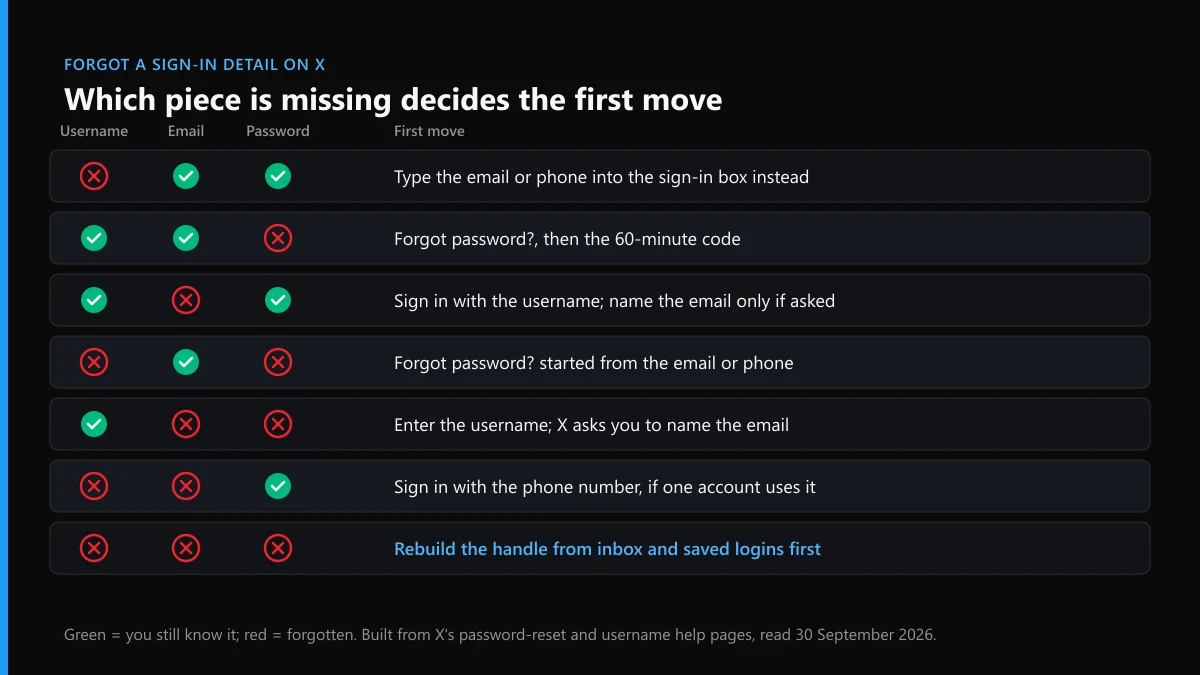
Which sign-in detail did you forget, and which of the others still works?
The username is the piece X needs least. X proves who you are through the email address and phone number on the account; the @handle is a public label that anyone can type.
That changes the question. You are not trying to remember three things. You need one of two, the email or the phone, and the rest follows. X's password reset page puts it plainly: a reset needs access to the phone number or email tied to the account, and the sign-in box accepts either one in place of a username. The table sorts the seven ways the three details can go missing.
| You forgot | You still have | First move | Where it can stall |
|---|---|---|---|
| Username only | Email or phone, and the password | Sign in with the email or phone instead | A phone number shared by two accounts |
| Password only | Username, email or phone | Forgot password?, then the emailed or texted code | The code expires after 60 minutes |
| Email only | Username and password | Sign in normally; X asks for the email only on a reset or a security check | A check that wants the email you forgot |
| Username and password | Email or phone | Start the reset from the email or phone | Text resets are off when login verification is on |
| Email and password | Username | Enter the username, then guess each address you have owned | No address you try is accepted |
| Username and email | Password, maybe a phone | Sign in with the phone number and password | No phone on the account |
| All three | Your own records | Rebuild the handle and address from inboxes and saved logins | Nothing found: X has no further route |
The last row sounds hopeless and usually is not. Forgetting which address you used is a different problem from losing the mailbox, and the first one can be solved from your side of the screen.
Is the account still signed in somewhere you can read it?
Check this before anything else. A password reset signs you out of every active X session, including the one that could have shown you your username and email.
X's own recovery tips start here too: look for the account still logged in on the X app, mobile.x.com or X Pro. Think wider than your current phone. An old handset in a drawer, a tablet, the browser on a work laptop or a scheduling tool can all hold a session for months. On any of them, open the profile. The @username sits under the display name, and the address bar reads x.com/ followed by the same handle. For the email and phone, go to Settings and privacy, then Your account, then Account information; X may ask for the password again before it shows them, so read the username first.
When we read X's reset page on 30 September 2026, the order of its notes stood out. The steps come first, and the warning that a reset logs you out of all active sessions sits underneath them. Followed top to bottom, that order has people reset first and lose the one screen that held the answer. If a live session can open the account but you have forgotten the password, X notes you can send yourself a reset email from the password settings page instead, which keeps that session open while you finish.
How to recover my Twitter username from outside X
Look where the handle was written down for you. Mail, saved passwords, browser history and other people's conversations all hold it, and none of them needs X's help.
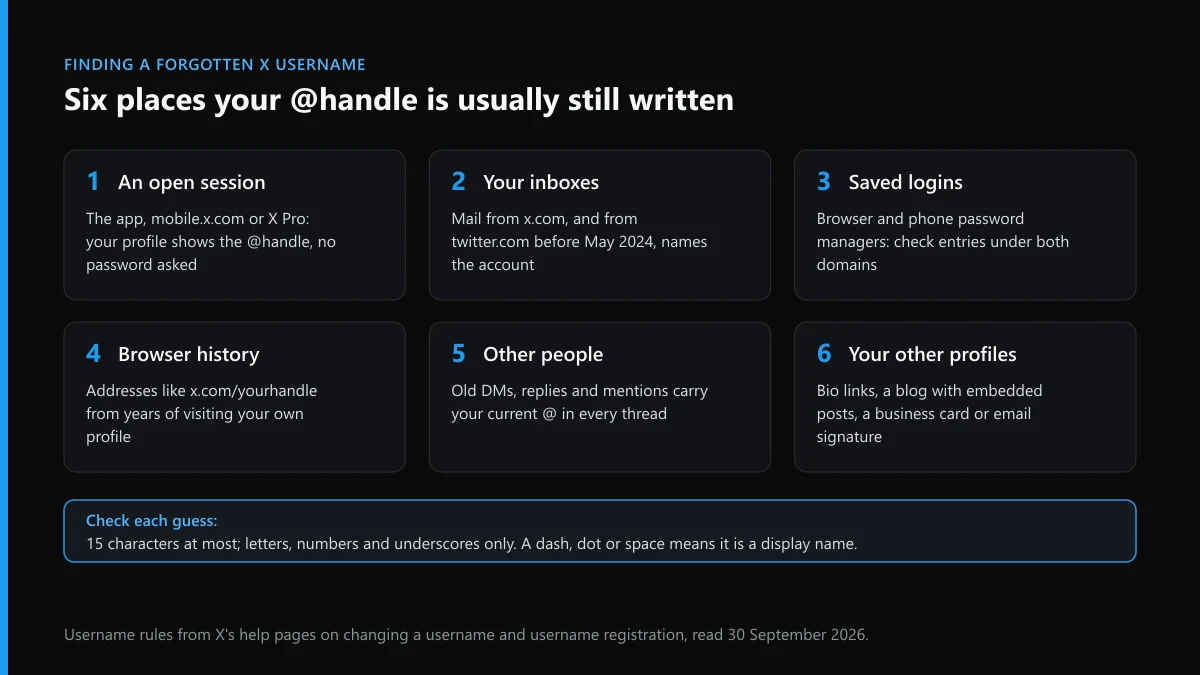
- Your inboxes. Search every address you use for mail from x.com, and from twitter.com for anything older than the domain switch in May 2024. Notifications, login alerts and reset emails are addressed to the account.
- Saved logins. Open the password manager in Chrome, Safari, Firefox, Edge or your phone and search both domains. The entry's user field often holds the handle itself.
- Browser history. Search it for "x.com/" and "twitter.com/". Years of opening your own profile leave its address behind.
- Other people. A friend's DM thread with you, or a reply you once sent them, shows your current @. X changes the handle across old conversations when you rename the account.
- Your other profiles. An Instagram bio, a LinkedIn contact block, an email signature or a blog with embedded posts often links straight to the profile.
Then test each guess against X's rules before you type it anywhere. X's page on changing a username says a handle must be longer than 4 characters and no more than 15, using only letters, numbers and underscores. The display name is a separate field of up to 50 characters that can hold spaces. A remembered name with a dash, a full stop or a space in it is the display name, not the username, and the sign-in box will not recognise it.
Last, open x.com/ followed by the guess in a private window. If the photo and the old posts are yours, you have it. If a stranger's profile loads, either the guess is wrong or someone else holds that handle now, which is the next section.
What if you changed the handle and only remember the old one?
Then the old one may already belong to someone else. X states that once you change your username, the previous one becomes available to anyone immediately.
That catches people who renamed the account years ago and still think of it by its first name. Typing the old handle into the Forgot password? page does one of two things. It fails, because nobody holds it, or it starts a reset for a stranger's account, and the code goes to that stranger. Neither helps you. Go back to the email or phone instead; they did not change when the handle did.
The rename itself left clues. X says followers, Direct Messages and replies carry over to the new username, so a friend's old message thread with you shows the current handle, not the one you remember. That makes someone you messaged often the quickest lookup you have.
Wanting the original handle back is a separate fight. X does not release inactive usernames on request, a policy explained in why X will not hand over a dormant handle, and a name another person now uses is theirs unless their account breaks the rules. Where the new holder is posing as you, with your name, photo or old bio, that is impersonation, and X's impersonation form is built for it.
Twitter account recovery when you forgot the email as well
X will not tell you which address is on file. It only accepts a correct guess, so the work is narrowing the guesses down before you make them.
Start from the username. X's reset page says that entering a valid username makes X ask for the email address on the account, and that providing the right one lets you choose how to reset. Try every address you have owned, work and school ones included. If none lands, repeat with old phone numbers; the right one gets a texted code, unless more than one X account uses that number, in which case this step will not work at all.
Three facts cut the list down:
- An email address can belong to only one X account at a time, according to X's page on updating the account email. If you run two accounts, the address on the other one is not the address on this one.
- The mailbox that receives X's notifications is normally the address on file. When the address changes, X emails the old one about it and keeps a history of previous addresses, so the most recent X mail points to the current address.
- X says it sends email only from @x.com, and since early June 2026 it adds a Mark Certificate, which shows as a blue checkmark next to the sender in most major mail apps. Genuine X mail is therefore easy to separate from the fake kind in a search.
If you know the address but can no longer open the mailbox, the order flips: recover the mailbox through Gmail, Outlook or whichever provider runs it, then come back to X. The recovery routes for hacked, locked and deactivated accounts go through that case, including what happens when an intruder changed the email. Without any address or number you can reach, X's help page is frank that recovery options are limited and a new account may be the only path.
How to recover a Twitter account if you forgot the password
You replace the password rather than recover it. X never shows an old password, so the route is a code to the email or phone, followed by a new one.
Before you ask for that code, check whether you can simply read the password. Browser and phone password managers keep entries by website, and a password saved before X moved its web address from twitter.com to x.com on 17 May 2024, as 9to5Mac reported that day, may still be filed under the old domain. Search both. If it is there, sign in; no reset is needed and every open session stays alive.
If it is not, run the reset. Tap Forgot password?, enter the email, phone or username, pick where the code should go, and enter it within 60 minutes. Two limits apply. X switches off text-message resets for accounts enrolled in login verification, so a 2FA user resets by email only. And a string of wrong passwords can trigger a temporary lock that has to clear before anything works. If the code arrives but the second login step then asks for a code from a phone you no longer have, that is a different lock; getting past a lost two-factor code covers it.
Set a password you have never used anywhere, and save it in the same manager you just searched, under x.com this time.
In what order do you recover a Twitter username and password together?
Username last. Start from the email or phone, reset the password, and read the handle off your profile once you are inside.
People who forgot both tend to spend an hour on the username and five minutes on the reset, when the reset would have handed them the username anyway. This order avoids the detour:
- Look for a signed-in session first. Any device still logged in shows the @handle on the profile and the email under Account information, and a reset would close it.
- Search saved logins under twitter.com and x.com. A saved entry can give you the password, and often the handle, without a reset.
- Find the address X writes to. Search each mailbox for mail from x.com or twitter.com; the one holding the latest notices is almost always the address on file.
- Start Forgot password? from that email. Use a phone number only if no other X account shares it.
- Enter the code within 60 minutes. Request a fresh one if it expires rather than retrying the old one.
- Set a new password, then write down the handle. Open your profile, note the @username and the email, and store both with the new password.
Step six is the one people skip, and it is the reason many of them are back on this page a year later.
When nothing comes back, who can still help and who cannot?
Nobody outside X can pull your username, email or password out of its systems. X itself, without the email or phone, points you to a new account.
That leaves a gap scammers are happy to fill. Replies under an "I can't get into my Twitter" post often fill up with recovery "experts", and the pitch mirrors the market for bots sold for mass-reporting X accounts and the ban tools advertised in replies: an upfront fee and a promise nobody outside X can keep. Instagram users see the same offers dressed as spam-report bots for Instagram or paid Instagram mass-reporting, and TikTok users get the TikTok version of the same pitch. What we found when we checked mass-report sellers applies here word for word. The tells of a scam profile are the same whether it sells bans or recoveries, and a real X email never asks for your password.
A stranded account still exists, and its future is not entirely out of your hands. Someone who can prove authority, such as an estate executor, may be able to act on it, as who may close an X account on someone else's behalf explains. If you do get back in and want out, wiping the old posts in bulk and then closing the account for good is a clean exit. Before any legal step against X over a lost account, read who a court case over X can name.
What should you report if someone uses your name while you are locked out?
Report the copy, not the lockout. A lost password is not a rule violation, but a stranger wearing your identity is.
Abandoned or forgotten accounts attract copies. A fake account wearing your photo, posts published under your name by an impostor or a clone messaging your followers can all be reported while you are still outside. For one post, reporting one tweet is the quickest step; for the whole profile, the account-level report inside X and every route to having an X account removed lay out the options, and each report option X builds into the app maps violation to form. Know what a report is able to remove and how long X takes between report and ban before you expect results.
Copied material has its own routes: copyright takedowns on X, a DMCA notice against a copied post, and, for stolen product photos in fake shops, counterfeit reports that X leaves unanswered. If the copy is used to go after people, report it as a harassment campaign or as hateful posts; coordinated pile-ons and fake job offers go through the brigading and job-scam route. A post aimed at you personally can go through getting a post about you taken down.
Do not answer a copy with a crowd. Whether piling reports on one account works is covered elsewhere, and the short answer is that X weighs the violation, not the count; the conduct that really gets an X account banned shows what reviewers act on. For Instagram, how Instagram handles account takedowns follows similar rules. If an impostor is using your old handle, tell us what the copy account is doing. The full list of X guides on this site sits on the hub, and the Twitter Ban Service front page explains what we take on and what we turn down.
FAQ
Can X email me my username if I forgot it?
X has no username-reminder option. Type your email address or phone number into the sign-in box or the Forgot password? page instead; both work in place of the username. Once you are signed in, the @handle sits under your name on your profile.
Can I log in to X with my email instead of my username?
Yes. The sign-in box takes a username, an email address or a phone number, and your password works with any of them. The exception is a phone number shared by more than one X account, which cannot start a password reset, so use the email in that case.
How do I find out which email is on my Twitter account?
From a session that is still signed in, open Settings and privacy, then Your account, then Account information. Signed out, X only confirms a correct guess: enter the username on the Forgot password? page and try each address you own. The mailbox holding X's notification emails is usually the one on file.
Can I recover my Twitter password itself instead of resetting it?
X cannot show you an old password; it only lets you set a new one through a code. Your own password manager may still hold it, often filed under twitter.com if it was saved before the May 2024 switch to x.com. If it is not there, the reset code to your email or phone is the way in.
I changed my Twitter username. Can I get the old one back?
Only if nobody has claimed it. X says a previous username becomes available to anyone the moment you change it. X also does not release inactive usernames on request, so a handle someone else now holds usually stays theirs.
Why does X ask me for an email when I entered my username?
A username is public, so X asks for the email address tied to it before it offers a reset. Type every address you have used; the right one opens the choice of where to send the code. If none fits, repeat the step with your old phone numbers.
Is an email offering to recover my X username real?
Check the sender and the content. X says it sends email only from @x.com, never attaches files, and never asks for your password by email, Direct Message or reply. Since early June 2026 its emails also show a verified blue checkmark in most major mail apps. A message without it is safe to delete.
Can I recover a Twitter account with no username, email or phone?
Not through X's reset flow. X's password help page says that without access to the phone or email you cannot recover the password and may need a new account. The realistic move is to win back the old mailbox through its provider, then start again from that address.