30 September 2026 · Twitter Ban Service · 13 min read
Locked Twitter account recovery: what each lock screen wants from you
Locked Twitter account recovery depends on the lock. A phone, email or reCAPTCHA check lifts as soon as you pass it. A security lock clears with a password change. An age lock needs proof you are now 13 or older, and X deletes what you posted before that birthday. Only a suspension needs an appeal.
Which Twitter lock screen are you looking at?
Read the exact words before you tap anything. X uses at least six lock and limit messages, and each one has its own way out.
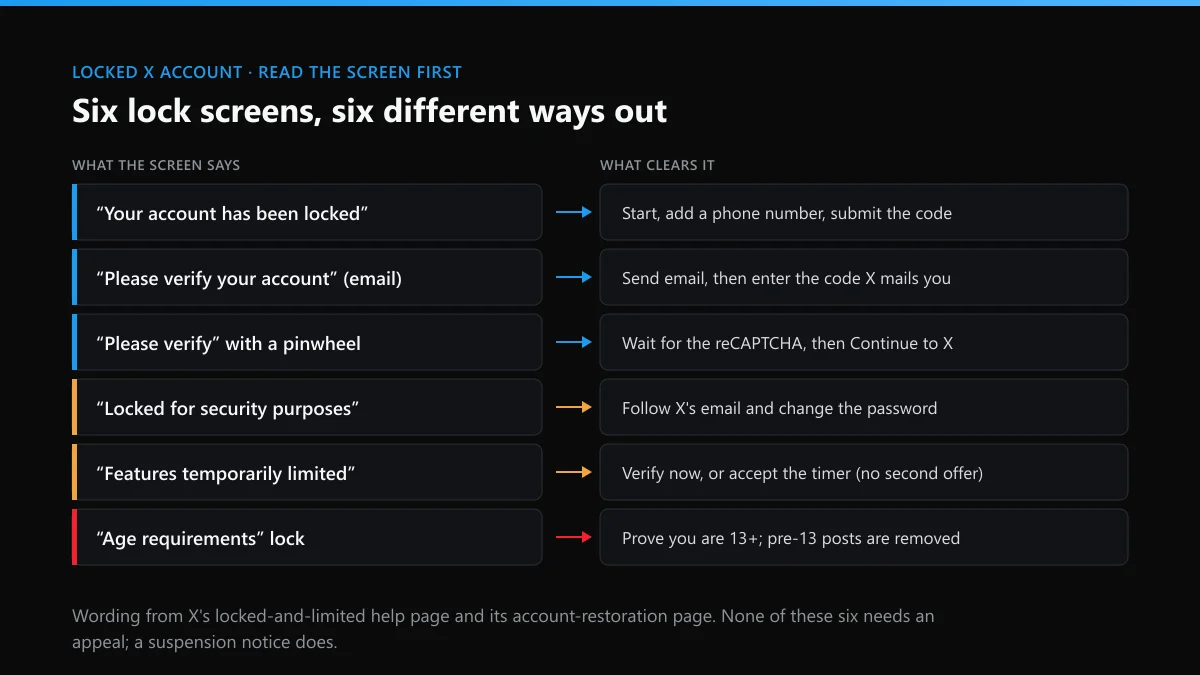
The wording below comes from X's help page on locked and limited accounts, which we read in full on 30 September 2026, plus its separate page for age locks. The column that matters most is the third one. Four of the seven rows clear in minutes from your own side, with no form and no waiting on a reviewer.
| What the screen says | What X is testing | What clears it | How long |
|---|---|---|---|
| "Your account has been locked", with a Start button | That a person with a phone owns it | Enter a phone number, then the texted or spoken code | Minutes, once the code lands |
| "Please verify your account", email version | That the address on file is yours | Send email, then type the code | Minutes |
| "Please verify your account" and a spinning pinwheel | That no script is driving the session | Nothing; wait, then Continue to X | Seconds |
| Locked "for security purposes" | That the owner, not an intruder, is signing in | Change the password from X's prompt or email | As soon as the password changes |
| Account features "temporarily limited" | Aggressive following, liking, reposting or quoting | Verify by phone or email, or accept the timer | A period X sets for the case |
| Limited because it "may have violated the X Rules" | One post or action X flagged | Read-only use, DMs to followers only; delete the post if asked | Countdown starts after deletion |
| Locked for "age requirements" | A birth date showing you were under 13 at sign-up | Restoration flow, or proof of the real date | Up to 72 hours; 30 days to start |
While a check is pending, visitors to your profile see a warning that the account "has displayed unusual activity". X's enforcement page adds that a locked account drops out of follower counts, Reposts and Likes until the challenge is done, which is why friends notice before you do.
How do you recover a locked Twitter account you can still log in to?
Log in on the web, press Start on the lock message and give X the phone number or email it asks for; the account unlocks the moment you submit the code.
- Log in from a web browser on the device you normally use. The lock message appears straight after the password.
- Select Start. X names the check it wants on the next screen.
- Give a phone number or email you intend to keep. X's own wording is "we will associate this phone number with your account", so a borrowed number stays behind after the lock is gone.
- Enter the code. X warns it "may take a few minutes". After that, look in spam, junk and social folders, or pick a phone call instead of a text.
- On a pinwheel, do nothing. The reCAPTCHA runs in the background; press Continue to X when it offers.
- On a security lock, change the password first. Then open Settings and privacy, Apps and sessions, and log out every other session.
Step 3 is the one people regret. A partner's phone or an office line solves today's lock and becomes tomorrow's problem when that person leaves. If the account really belonged to a company or an agency, who X will deal with over an account someone else controls is worth reading before you attach anyone's number. If the trouble is a forgotten password or a lost 2FA device rather than a lock, the page on getting back into an X account by the route you still hold covers those exits.
What if the phone number or email on the account is gone?
Then you can't pass the check from your side. X's help page sends you to its support team and admits that "sometimes the only option" is a new account.
That sentence is blunt, and it matters. A lock is built around one proof of ownership, and when both the number and the inbox are dead there is nothing left for the screen to test. When we opened X's account access form on 30 September 2026, its first question offered four choices. "I need to regain access to my X account" fits a lock you can't even log in to. "Appeal a locked or suspended account" fits one you can log in to but can't clear.
Before you file, try to get the old email address back from its provider, since that is a quicker win than anything X offers. And if an old handle matters more than the account, know the limits: the rules for requesting an inactive X username don't reach a locked account that still exists.
Why did Twitter lock my account for no reason?
Usually because a filter saw a pattern: a burst of follows or likes, a login from somewhere new, or an app acting in your name. Now and then the filter is simply wrong.
X's help page names the patterns itself. A limit follows "aggressive following or aggressive engagements (such as, like, repost, and quote)". A security lock follows "suspicious behavior" that suggests the account "may have been compromised". A reCAPTCHA lock follows "suspicious automated behavior". X's automation rules, updated in April 2026, forbid automated likes and "scripting the X website", so a browser extension that clears your notifications can count. The 400-follows-a-day figure on X's limits page is described as "a technical account limit only", not a safe pace. You can be limited well below it.
And sometimes nobody did anything. On 13 March 2026, X's head of product Nikita Bier posted that for about 12 hours a new spam filter had falsely tagged a subset of accounts, and that 99% had been reverted. If your lock dates from a day like that, pass the check and move on. There's nothing to confess in an appeal. If the lock came with a suspension notice instead, why X suspends accounts it can't explain reads the labels on that screen.
Why is my new Twitter account locked?
Because a fresh account has no history to weigh against its first hour. The same burst of follows that a ten-year-old account survives looks like a bot on day one.
X doesn't publish its thresholds for new accounts, but it gives the case its own line: "If you're setting up a new account and get locked out, contact our support team." Its sign-up step also asks for an email or phone number, and those are the details a lock will test later, so a throwaway inbox is a false saving.
Three day-one habits tend to set it off. Following dozens of suggested accounts in a row reads as aggressive following. Connecting a follow-back or growth app breaks the automation rules outright. And opening a new profile because another of yours was suspended runs into the Authenticity policy, which treats other accounts as ban evasion "regardless of when the other account was created". In that last case the lock is often the first step toward a suspension. Complete the profile, add a photo, verify the email, then follow at the pace a person reads.
Twitter locked my account because of age: how do you unlock it?
First check whether the birth date on the account is true. If you really signed up before 13, use X's restoration flow; if the date is wrong, you have to prove the real one.
X requires every user to be at least 13. When the birth date on file says you were younger than that on the day the account was made, the account locks, however old it is now. The trap is the edit. In a November 2023 thread on X's developer forum, an owner wrote that they had changed their birth date, that they had been 12 when they created the account in 2008, and that appeals were "automatically closed". Another poster in the same forum thread said they had already submitted ID and been emailed about the restoration tool. In June 2026 a user described a friend's 2009 account locked for "age requirements" after she changed the password and the date of birth while fighting off a scammer, and then could not log in to start the restoration at all.
Birth-date prompts can lock an account too. The UK policy writer Monica Horten reported that X locked her account on 19 July 2024 because she had never given a date of birth. Friends suggested a fake date, and she declined. That was the right call: a fake date typed in to get past a prompt is exactly what trips the age lock later.
Can you recover a locked Twitter account because of age?
Yes, if you are 13 or older now, but not intact. X's account restoration page says it removes what you posted, liked and messaged before your 13th birthday.
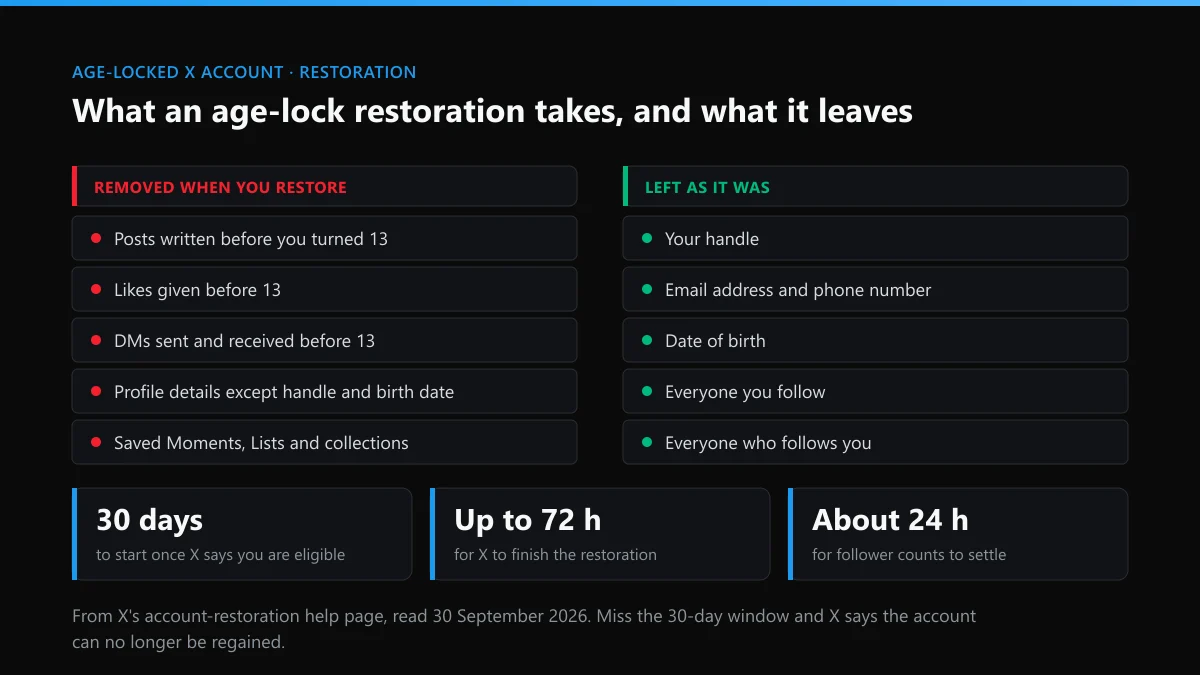
Handle, contact details, birth date, followers and follows all stay. Profile details other than the handle and date go, along with saved Moments, Lists and collections, and X opts you out of some personalisation settings. X prompts eligible owners inside the account, gives them 30 days to start, and says the process "can take up to 72 hours". Miss the window and, in X's words, "you'll no longer be able to regain access to your account".
This is an old bargain. In June 2018, as the GDPR took effect, Twitter locked accounts set up by people under 13 "regardless of how much time had passed", Engadget reported. The fix it promised was the same deletion of pre-13 tweets. If there is something from those years you want to keep, a data request is the only copy X offers. The page on what bulk tweet deletion costs and where it stops explains why cleaning up by hand afterwards is slow.
How to unlock my suspended Twitter account when it turns out to be more than a lock
You can't clear a suspension from a lock screen. Log in on the web, open a new tab and file X's appeal from inside the suspended session.
The giveaway is what strangers see. A locked profile shows an "unusual activity" warning; a suspended one shows "Account suspended". Our walk-through of the appeal that fits each cause of a suspension has fill-in examples and X's EU response times. Two limits apply either way. A suspended account can't be closed until an appeal is filed, which how X handles permanent deletion and its 30-day window explains. And an appeal is a request to X, not a legal claim; if you are weighing that step, read who a claim over an X account can actually name first.
What turns a temporary lock into a lost account?
Three moves do most of the damage: typing a fake birth date, paying an "unlocker", and following a DM that promises to verify you.
The first is covered above. The second is a market of its own. Sellers promise to unlock or reinstate accounts, and every one of them needs either your password or your codes; we looked at what these shops actually deliver in our check on sellers of Twitter bans and reports. The third arrives disguised as X. In January 2026 the Better Business Bureau warned about phishing that locks X accounts and then uses them to push crypto, and the signs that a Twitter DM is a scam apply word for word. X's real lock screen lives inside the app or on x.com. It never arrives as a link in a message.
Did an impersonator or a report campaign set off the lock?
Clear your own lock first, then deal with the other account. X handles the two separately, and neither waits for the other.
A copy of your profile. Followers who report a clone sometimes report the original too. File a removal request against the account posing as you, and use the tweet-level impersonation report for posts made in your name. A fake account that copies no one in particular goes through the ordinary report menu.
A wave of reports. Some owners are locked after a group turns on them with a Twitter mass-report bot or a tool sold as a ban button, or pays someone to mass report a single X account. X's position is that volume does not decide the outcome, which the limits of what one report can take down sets out, and how long X takes to act on a report gives the other side of the clock. Campaigns recruited through fake job offers are covered in reporting brigades and job scams. The same crews sell Instagram mass reports, spam-report bots for Instagram and Instagram takedowns on demand, and whether the trick works on TikTok has the same answer. Check your other profiles.
Abuse aimed at you. If the campaign came with slurs or threats, the rules on hateful conduct on X and on harassment aimed at one person are what a report should cite.
How do you report the account behind it without making things worse?
Report the one rule it breaks, with screenshots, through X's own forms. A pile of reports adds nothing, and false ones can cost you your own reporting access.
For a single post, the steps for reporting a tweet cover each menu option; for a profile with a pattern, use the whole-account report on X. Shops that sell tools with official-sounding names are compared in what a Twitter report tool can and can't do. If the account sells fakes of your products, why counterfeit reports stall on X lists what to attach. Stolen photos or videos go through a DMCA notice for an X post, and X's copyright removal process explains the counter-notice. For other posts about you that should come down, see removing tweets that break X's rules.
None of this is about silencing people you disagree with. When someone can be banned from Twitter and what it takes to take down an X account both set out which violations qualify. Every guide is listed on the solutions hub for X account problems, the Twitter Ban Service front page explains how a case runs, and the case-review contact page is where to send an account that is still active.
FAQ
How long does a Twitter account stay locked?
A phone, email or reCAPTCHA lock has no timer; it stays until you pass the check. A temporary limit runs for a period X sets for each case. An age-lock restoration takes up to 72 hours once you start it, and you have 30 days to start it.
Will my followers come back after the lock is lifted?
Yes. X takes a locked account out of follower counts, Reposts and Likes until the challenge is completed, which is why numbers drop. After an unlock, X says follower and following counts can take up to 24 hours or so to return to normal.
Can I unlock my Twitter account without a phone number?
Only if the screen offers email or a reCAPTCHA check instead. When it asks for a phone, you need a number that can receive a code, and X attaches that number to the account. If you have neither the phone nor the email, X's help page sends you to its support team.
Why does X lock my account again right after I verify?
Because whatever set off the first lock is still running. The usual culprits are a connected app that likes or follows for you, a browser script, a follow routine, or someone else signed in. Revoke unknown apps, log out other sessions and change the password before you verify again.
Can someone else unlock my X account for me?
Only by receiving your codes, which means holding your phone or reading your inbox. Anyone offering to unlock an account for a fee is asking for exactly that access, and a person with your codes can lock you out for good.
I am under 13 and my account is locked. What can I do?
Wait. X's restoration is open to owners who signed up before 13 and now meet the minimum age. When you turn 13 and X marks the account eligible, you get 30 days to start, and the posts, likes and messages from before your birthday are removed.